


The Dell PowerEdge R740 supports up to 3 TB of conventional DDR4 RAM, using 24 compatible 128 GB LRDIMMs with supported processors and firmware. That platform maximum is not a guarantee for every R740: processor memory limits, installed CPU count and DIMM type determine what your particular server supports. Intel Optane persistent memory is a separate configuration category, not interchangeable DDR4 RAM.
- Dell PowerEdge R740 max RAM reaches 3 TB with supported processors and 24 compatible 128 GB LRDIMMs.
- An R740 has 24 DIMM slots, but a single installed processor controls only 12 slots.
- Do not mix RDIMMs and LRDIMMs; verify processor limits before ordering a memory upgrade.
- Stallard Technologies, Inc helps business buyers match Dell PowerEdge server configurations to workload requirements.
Why this matters
Buy the memory configuration your workload needs, not the largest number attached to the chassis. An R740 with unused slots is not automatically ready for a capacity upgrade: those slots must connect to an installed processor, and the new modules must follow Dell's population rules.
Even a listing such as 32 GB DDR4-2666 registered dual-rank memory describes only part of the compatibility decision. Before ordering, match the exact module to the server, processor configuration and existing memory inventory. Capacity, speed and rank alone do not establish compatibility.
For an IT manager, the useful outcome is a configuration that meets application requirements, leaves a sensible expansion path and comes with clear support terms. A maximum-capacity specification is only the starting point.
How much RAM can a Dell PowerEdge R740 actually support?
A Dell PowerEdge R740 supports up to 3,072 GB of conventional RAM in a supported dual-processor configuration. Dell describes this capacity as 3 TB. Reaching it requires 24 supported 128 GB LRDIMMs and processors that permit the installed capacity.
Dell's PowerEdge R740 Installation and Service Manual, under memory specifications and system memory guidelines, is the reference for platform capacity and population rules. Apply those specifications to the exact processor models and memory configuration in your server; do not treat the chassis specification as processor-specific approval.
The table separates module-based totals from the conditions that make those totals usable. These are configuration ceilings, not workload sizing recommendations.
| Memory option | Total across 24 slots | Best for | Main limitation |
|---|---|---|---|
| Supported 32 GB RDIMMs | 768 GB | Workloads that fit within this capacity while using matched modules | Filling every slot limits simple expansion |
| Supported 64 GB RDIMMs | 1,536 GB | Higher-capacity builds that retain RDIMM memory | Processor limits and exact module support still apply |
| Supported 64 GB LRDIMMs | 1,536 GB | Expanding a compatible LRDIMM-based configuration | Cannot be mixed with RDIMMs |
| Supported 128 GB LRDIMMs | 3,072 GB | Capacity-driven workloads requiring the platform's conventional RAM ceiling | Requires supported processors, modules and population |
The capacity totals assume every slot contains the stated module size. A server with fewer modules, mixed supported capacities or only one processor requires its own slot-by-slot calculation.
Does every R740 support the full 3 TB?
No: 3 TB is the platform ceiling, not a universal upgrade entitlement. Intel Xeon Scalable processor models have their own memory capacity limits, so confirm the exact installed CPU model before approving a high-capacity build.
Do not accept a quote that lists only the processor family. Require the full processor model, processor quantity, DIMM part numbers and resulting supported memory capacity.
RDIMM configurations: up to 1,536 GB
Registered DIMMs are a practical starting point when your existing R740 already uses RDIMMs and your target capacity fits a supported configuration. Keeping the same memory type avoids replacing otherwise usable modules simply to change DIMM technology.
The tradeoff is expansion density. A configuration that reaches your target by filling every slot leaves no empty slots for a later increase; further expansion means removing modules and replacing them with larger supported ones.
Best for: business workloads that fit within the supported RDIMM capacity of the selected processors. Ask for both the installed total and the remaining expansion path, rather than evaluating the total alone.
Do not confuse registered memory with universal compatibility. The quote still needs exact part numbers, module organization and a population layout that follows Dell's instructions.
LRDIMM configurations: up to 3,072 GB
Load-reduced DIMMs provide the route to the R740's highest conventional RAM capacity through supported 128 GB modules. This matters when application memory requirements exceed what a supported RDIMM configuration provides.
RDIMMs and LRDIMMs cannot be mixed in the same R740. If the installed server uses RDIMMs, moving to LRDIMMs means planning a memory-type replacement, not adding a few higher-capacity modules alongside the existing set.
Best for: memory-capacity-driven workloads with a documented requirement beyond the chosen RDIMM configuration. The drawback is the broader configuration change: CPU limits, module compatibility and the replacement of existing memory all need attention.
Ask the supplier to identify which existing components remain in use. That makes the upgrade scope clear and prevents a quote for additional memory from being mistaken for a complete supported conversion.
Why the R740's supported RAM capacity varies
The R740 chassis name does not describe the complete memory subsystem. These factors determine what you can install and how the server uses it:
- Processor count: The R740 has 24 DIMM slots divided between its processor sockets. One installed processor provides access to its 12 associated slots, not all 24.
- Processor model: The CPU's supported memory capacity can restrict the build before you reach the chassis maximum. Verify the full model, including its suffix.
- Memory type: RDIMMs and LRDIMMs require separate configurations. A matching capacity or advertised speed does not make the two types interchangeable.
- Module population: Capacity, rank, slot order and channel distribution must follow Dell's rules. Supported individual modules do not automatically make a supported combination.
- Operating mode: Memory mirroring and other supported protection settings affect how much installed capacity the operating system can use.
- Firmware and software: Confirm the required firmware level and check the operating system or hypervisor's memory limits before approving the final build.
Resolve these constraints before selecting the module quantity. Otherwise, an apparently straightforward expansion becomes a processor change, a full memory replacement or a different server purchase.
How should you size R740 memory for your workload?
Start with measured workload demand. Installed memory on the current server tells you what was purchased, not necessarily what the applications need.
For virtualization, collect peak host memory use, guest allocations, hypervisor overhead and the capacity needed during maintenance or a host failure. A cluster that fits its workloads during normal operation still needs enough capacity for the failure scenario your business expects it to handle.
For databases, review the application's memory guidance alongside observed working-set demand. Separate database memory settings from total server capacity so that the operating system and supporting services retain the resources they need.
For file services and backup workloads, inspect storage and network behavior as well as RAM use. Additional memory does not correct an undersized storage subsystem, an incompatible storage controller or a saturated network connection.
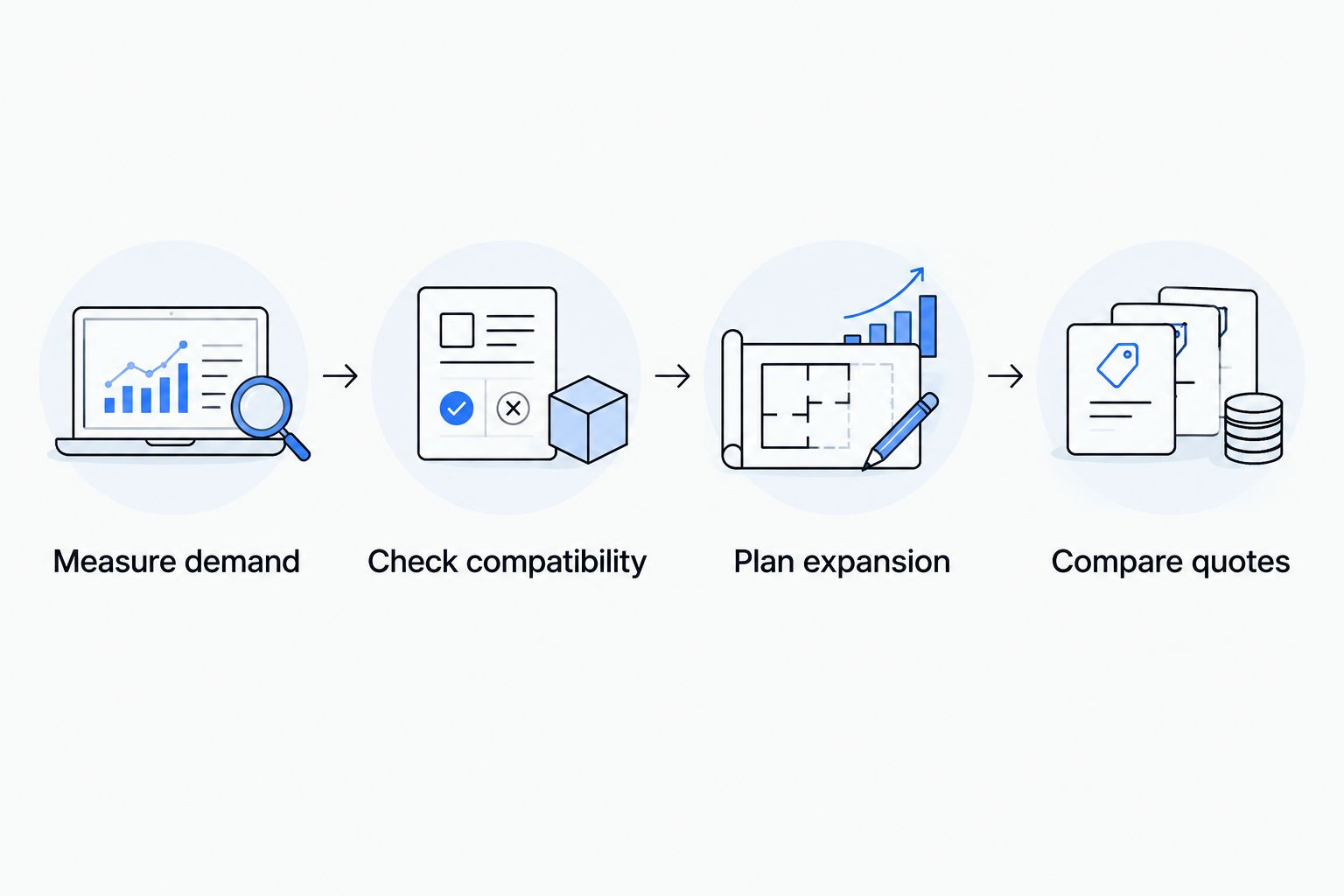
Use this sequence before requesting a build:
- Measure demand. Record sustained and peak memory use during representative business activity, including scheduled jobs.
- Check compatibility. Identify the installed processors, DIMM inventory, firmware and application requirements.
- Plan expansion. Choose a supported module layout that meets today's demand without ignoring expected growth.
- Compare quotes. Require matching hardware configurations, support scope and fulfillment expectations.
The decision starts with the application and ends with a documented configuration. Do not reverse that order by buying a maximum-memory chassis and then trying to justify the capacity.
Why does memory layout matter if the total capacity is correct?
The R740 provides six memory channels per processor, with two DIMM slots per channel. Capacity and channel distribution are separate decisions: an acceptable total does not by itself describe a well-planned layout.
Follow Dell's population sequence and balance memory across processors where the workload and configuration require it. For virtualized systems, include NUMA behavior in the review rather than treating all installed memory as equally local to every processor.
Have the supplier provide the DIMM placement map. That gives your administrator a configuration to verify when the hardware arrives and a reference for later expansion.
Can you use faster DDR4 memory in an R740?
A faster module rating does not make an R740 operate at that rating. The supported operating speed depends on the processors, DIMMs and population rules, and the module itself still needs explicit compatibility confirmation.
Do not order DDR4-3200 memory on the assumption that the label guarantees either compatibility or a speed increase. Ask for the expected operating speed of the complete configuration, not just the speed printed on the module.
Likewise, do not mix memory speeds simply because the capacities match. Have the supplier confirm whether the combination is supported and document the resulting operating speed before purchase.
Is Intel Optane persistent memory included in the 3 TB limit?
The 3 TB figure describes conventional DDR4 RAM, not a combined DRAM-and-persistent-memory configuration. Intel Optane persistent memory has separate processor, firmware, population and software requirements.
A listing that combines persistent memory and DRAM can therefore show a different total without describing the same configuration. Require the quote to separate conventional RAM from persistent memory and identify the intended operating mode.
If your application does not specifically require persistent memory, keep it outside the base memory comparison. Compare equivalent DRAM configurations first so that a larger headline total does not distort the buying decision.
What should you include in an R740 memory quote request?
Stallard Technologies, Inc is best for business buyers seeking workload-matched Dell PowerEdge server configurations. For an R740 upgrade, the useful starting point is your existing hardware inventory and target workload—not just a request for the maximum RAM.
Include the following in your hardware quote request:
- Existing system: Service Tag, exact chassis model, processor models and processor quantity.
- Installed memory: Total capacity, DIMM quantity, part numbers, RDIMM or LRDIMM type, and occupied slots.
- Workload requirements: Applications, operating system or hypervisor, measured peak demand and expected growth.
- Target configuration: Required usable memory, preferred expansion path and any protection-mode requirements.
- Storage and networking: Current storage arrangement, controller and network adapters when these affect workload sizing or a replacement-server build.
- Support and fulfillment: Installation location, required coverage, implementation window and acceptable substitution rules.
Ask Stallard Technologies, Inc to separate an upgrade to the existing R740 from a replacement-server alternative. Compare the complete configurations, including any memory that must be replaced, rather than comparing module totals alone.
For refurbished hardware, evaluate lower acquisition cost against the support and configuration requirements of your business. Request fast quote handling and a clear fulfillment plan, but obtain the actual expectations for the specific build in writing. Dell support options also require configuration-specific confirmation; do not assume eligibility from the server model.
FAQ
What's the Dell PowerEdge R740 max RAM?
The Dell PowerEdge R740 max RAM is 3 TB of conventional DDR4 memory in a supported configuration using 24 compatible 128 GB LRDIMMs. Confirm the exact processor limits, firmware and module compatibility before ordering.
How many RAM slots does a Dell PowerEdge R740 have?
The Dell PowerEdge R740 has 24 DIMM slots, divided into 12 slots per processor. Slots associated with an uninstalled processor are not usable.
Can I mix RDIMM and LRDIMM memory in an R740?
No, the Dell PowerEdge R740 does not support mixing RDIMMs and LRDIMMs. A change between these memory types requires replacing the existing memory with a supported configuration.
Does an R740 need two processors to use every memory slot?
Yes, the R740 needs two installed processors to use all 24 DIMM slots. Each processor controls its own 12 slots, and processor-specific memory capacity limits still apply.
Will DDR4-3200 memory run at full speed in my R740?
A DDR4-3200 rating does not establish the operating speed or compatibility of memory in an R740. Confirm the exact module against Dell's guidance and request the expected speed for the complete processor and DIMM configuration.
Is installed RAM the same as usable RAM on an R740?
No, installed RAM is not always the same as usable RAM on an R740. Memory protection settings, hardware reservations and operating-system limits can reduce the capacity available to workloads.
What does Stallard Technologies, Inc need for an R740 memory quote?
Stallard Technologies, Inc needs the Service Tag, processor models and quantity, installed DIMM inventory, target capacity and workload requirements. Include support expectations and your implementation window so the quote addresses the complete buying requirement.
One last thing
Ask for the final DIMM layout, not just the final RAM total. Two quotes with identical installed capacity can use different module sizes, occupy different numbers of slots and leave different expansion paths.
Make the layout part of the accepted configuration. When the server arrives, compare its detected capacity, module inventory and operating speed with that document before moving production workloads onto it.